
How to Automatically Follow and Unfollow People on Bluesky with BluePilot’s AutoPilot
Published: 11/5/2025
If you’re serious about growing your Bluesky presence efficiently, you’ve probably wondered if there’s a way to automatically follow and unfollow users on Bluesky without wasting hours scrolling.
Now there is, thanks to BluePilot’s new AutoPilot feature.
BluePilot is the ultimate growth assistant built specifically for Bluesky power users. With features like Smart Follow, Smart Unfollow, Smart Engage, and Smart Content, it helps you find real, relevant users, engage with your niche, and grow your audience organically.
And now, with AutoPilot, you can automatically follow Bluesky accounts and automatically unfollow users on Bluesky completely hands-free.
Why Automatically Follow and Unfollow Users on Bluesky Matters
Growing your audience manually takes hours every day. You have to scroll, find accounts, track followers, and unfollow people who aren’t engaging.
With automated following and unfollowing on Bluesky, you can:
- Build your community faster
- Focus on creating content instead of managing accounts
- Keep your audience active and engaged
- Grow consistently without missing opportunities
Introducing BluePilot's AutoPilot Feature
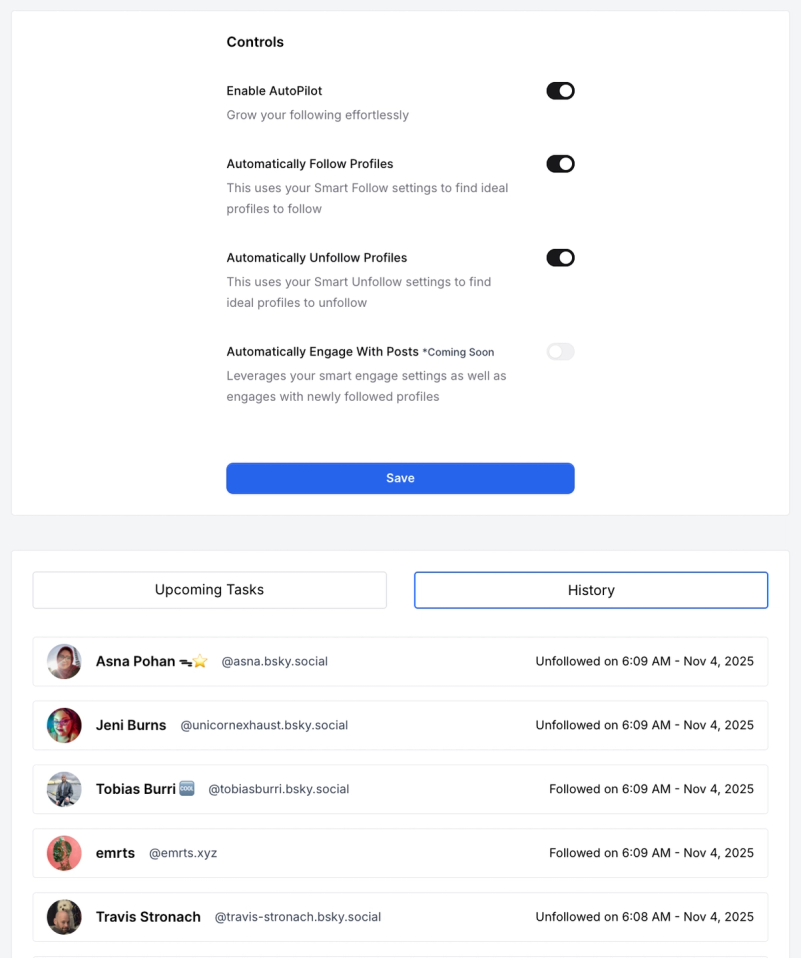
BluePilot’s AutoPilot is the easiest way to automate your growth on Bluesky. It combines your favourite features into one powerful system that runs in the background, letting you focus on content and connections.
Here’s what makes AutoPilot stand out:
- One-click activation: Turn it on or off instantly, no complicated setup
- Custom control: Toggle follow and unfollow modes individually
- Natural activity cycles: Operates in short bursts of action followed by rest periods that mirror real user behavior
- Time-zone awareness: Adapts to your schedule for local, real-time engagement
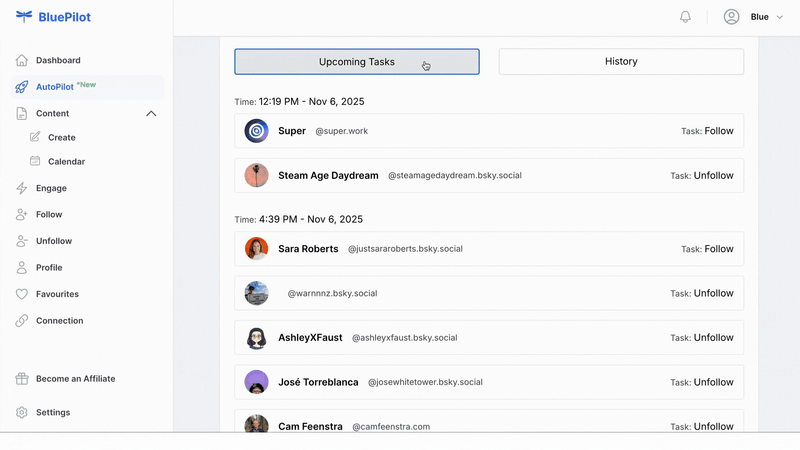
- Smart Queue integration: Follows and unfollows based on your personalized filters, and you can turn follow or unfollow on or off anytime
- Works alongside your activity: Complements your posting and engagement instead of replacing it
- Coming soon — Auto Engage mode: Automatically engage and connect with the right people while you focus on content
With AutoPilot, BluePilot takes care of the heavy lifting, so your account grows strategically and automatically while you focus on building your brand.
Learn more about all BluePilot’s new features.
How BluePilot’s AutoPilot Feature Works
1. Enable or Disable AutoPilot Anytime
You’re always in control. Turn AutoPilot on or off whenever you want to pause or adjust your automation.
2. Automatically Follow Users on Bluesky
AutoPilot uses your Smart Follow filters to find the best Bluesky accounts that match your niche. You can customize filters such as:
- Minimum number of posts
- Minimum and maximum followers
- Post recency (only follow active accounts)
- Whether profiles include a bio
- NSFW filtering
This ensures your automated following on Bluesky remains relevant and authentic.
3. Automatically Unfollow Users on Bluesky
AutoPilot uses Smart Unfollow logic to automatically unfollow users on Bluesky who no longer engage, don’t follow back, or aren’t a good match for your audience. It keeps your timeline and follow ratio clean and active.
4. Smart Engage (Coming Soon)
AutoPilot will soon include automated engagement, allowing you to interact with posts aligned with your Smart Engage filters. You’ll be able to automatically engage with Bluesky posts that matter to your community.
Why Automate Following and Unfollowing on Bluesky?
Growing your Bluesky audience takes time, and doing it manually can feel like a full-time job. Here’s why automated following Bluesky accounts and automated unfollowing Bluesky accounts make sense:
- Grow your following effortlessly: Automatically follow relevant accounts without the manual grind
- Keep your timeline active: Automatically unfollow accounts that aren’t a good fit for your audience
- Save time and energy: Spend more time posting and engaging, less time managing
- Targeted growth: Smart Queue ensures you follow the right kind of people who are likely similar to you based on your account favourites and personalized settings.
- Consistent results: Your audience grows steadily over time with minimal effort
Setting Up AutoPilot Step by Step
Here’s how to start using BluePilot AutoPilot to automatically follow and unfollow users on Bluesky in minutes.
Step 1: Connect Your Bluesky Account
Sign up or log into BluePilot and connect your Bluesky account.
Step 2: Teach BluePilot About You
Add your favourite accounts, target keywords, and filters so BluePilot understands what your ideal community looks like.
Step 3: Configure Smart Queue
Set parameters for the type of Bluesky users you want to follow, such as:
- Minimum posts, followers, or following
- Activity in the past few months
- Accounts with complete bios
- NSFW preference toggle
These inputs fuel your automated following Bluesky strategy.

Step 4: Configure Smart Unfollow
Set rules for who AutoPilot should unfollow, such as:
- Users who haven’t engaged recently
- Accounts that don’t follow you back
- Profiles outside your filters
Your automated unfollowing Bluesky workflow will stay clean and efficient.
Step 5: Turn On AutoPilot
Switch AutoPilot to “On.”
BluePilot will now automatically follow profiles and automatically unfollow profiles in the background, based on your Smart Queue settings.
For an in-depth walkthrough, see How to Build and Grow Your Bluesky Audience with BluePilot.
Combine AutoPilot with Smart Engage and Smart Content
The real magic happens when you use AutoPilot with Smart Engage and Smart Content.
- Smart Engage helps you find trending topics and keywords to engage with (Smart Engage: Auto like and auto reply on relevant posts on Bluesky).
- Smart Content generates post ideas, AI-powered inspiration, and trending insights (Smart Content: Create and schedule consistent bluesky posts).
Together, these tools make audience growth on Bluesky automated, authentic, and effortless.
Get Started: Grow Your Bluesky Following Now
If you’re ready to stop wasting hours scrolling and start growing smarter, BluePilot’s AutoPilot is your next step.
It’s built for creators, community managers, and Bluesky enthusiasts who want to:
- Automatically follow Bluesky accounts that matter
- Automatically unfollow users on Bluesky who don’t
- Build a meaningful, active audience
- Create and engage consistently without burnout
Start using AutoPilot today and see why it’s the best tool to automate following and grow on Bluesky.