New featureScheduling and posting are included with your subscription. Anyone can write drafts.
Write threads with images and link cards in the new composer
The new composer lets you write threads, add up to four images with alt text, show link previews and quote other posts, then post now or schedule for later, with a live preview of how it will look on Bluesky.
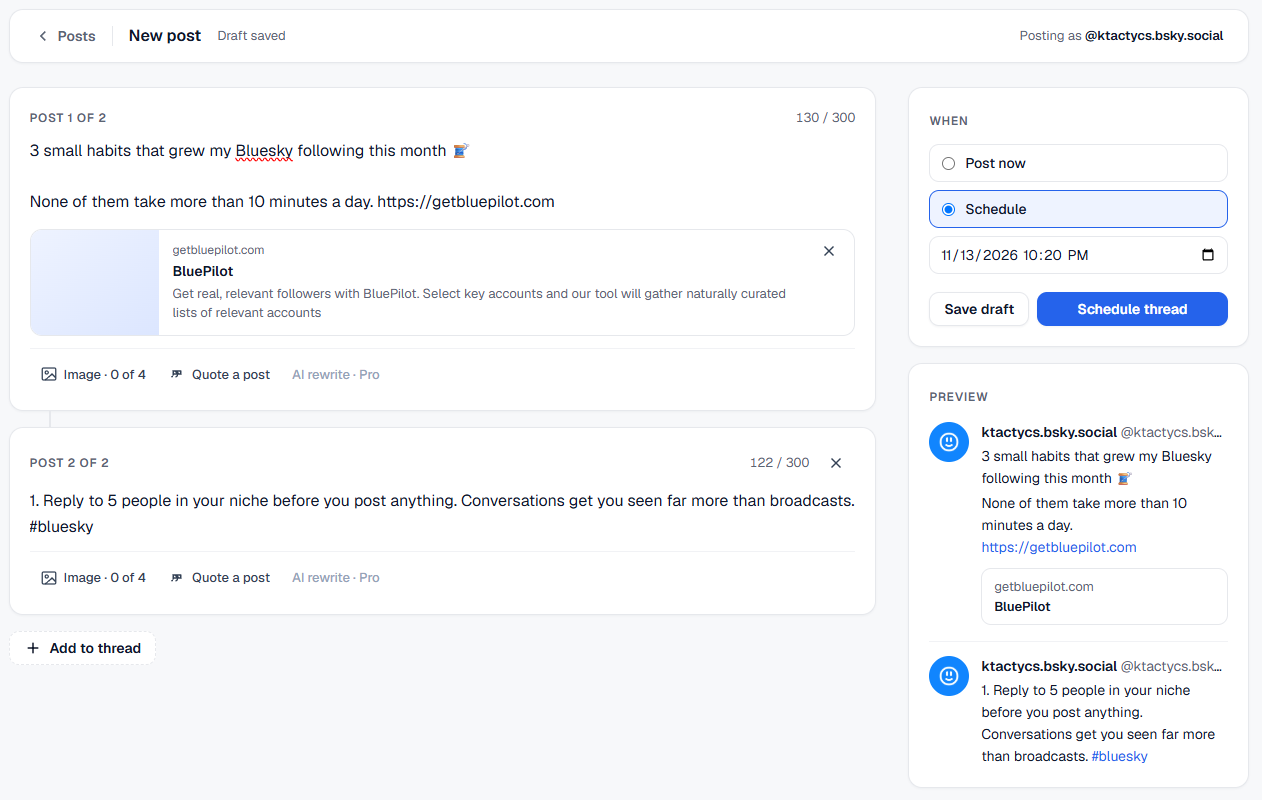
Writing for Bluesky in BluePilot now works the way you post: threads, images, links and quotes, all in one place, with a preview of exactly what your followers will see.
What you can do
- Threads. Add as many posts to a thread as you need. Each one has its own character count, so you always know where you stand against Bluesky's 300-character limit.
- Images with alt text. Add up to four images to any post. BluePilot asks for a description of each one, so your posts are accessible to everyone.
- Link cards. Paste a link and BluePilot builds the preview card with the page's title, description and image, just like Bluesky does.
- Quote posts. Paste the link to any Bluesky post to quote it with your own take.
- Clickable links, mentions and hashtags. Everything is linked the way it is in the Bluesky app.
- Drafts that save themselves. Start writing and BluePilot keeps your draft safe, so you can come back to it any time.
- Post now or schedule. Send it straight away, or pick a date and time and BluePilot posts it for you.
How to use it
- Click New post at the top of the sidebar.
- Write your post. Add images, a link or a quote, or click Add to thread for more posts.
- Check the preview on the right.
- Choose Post now or Schedule.
Try it on your Bluesky account
Scheduling and posting are included with your subscription. Anyone can write drafts..